

Occasionally, like any advanced electronic device, the J-Ray 75 ISP Laser System may need a hard reboot. This can occur if the laser becomes unresponsive, will not power down normally, or if the software freezes.
A hard reboot safely resets the internal electronics by temporarily disconnecting the internal battery. This guide walks you through the process step-by-step.
The procedure takes approximately 2–3 minutes and does not require any tools.
When Should You Perform This Procedure?
Perform this troubleshooting step if:
The laser does not turn off when pressing the power button
The screen is frozen or unresponsive
The system fails to boot normally
ServiceVet technical support recommends performing a reset
This process does not erase protocols, settings, or data.
Important Safety Notes
Before beginning:
Make sure no treatment is in progress
Return the therapy handpiece to its cradle clip
Ensure the laser is not connected to the external power supply
The internal battery will be removed temporarily; this will aid in accessing and disconnecting the battery connector.
Step-by-Step Instructions
1. Place the Laser on Its Side
Place your J-Ray 75 Laser gently on its side.
Position the laser on the side without the therapy handpiece fiber connection.
If you are facing the screen, this will be the left side of the laser.
2. Locate the Battery Access Cover
Once the laser is on its side, look at the bottom of the unit.
You will see the battery access cover, secured by a silver finger-tight knob.
3. Remove the Battery Access Cover
Unscrew the silver knob using your fingers.
No tools are required.
Once the knob is removed:
Lift the battery access cover
Set the cover and knob aside
4. Remove the Battery
Inside the compartment you will see the internal battery, which has a blue protective jacket.
Gently pull the battery out of the compartment so you can access the connection cable.
You need to fully remove the battery from the system.
5. Locate the Battery Connector
You will now see the battery cable connecting the battery to the laser module.
This cable uses a yellow electrical connector.
6. Disconnect the Battery Connector
Using both hands:
Hold the short side of the connector with your left thumb and index finger
Hold the long side of the connector with your right thumb and index finger
Refer to the image below.
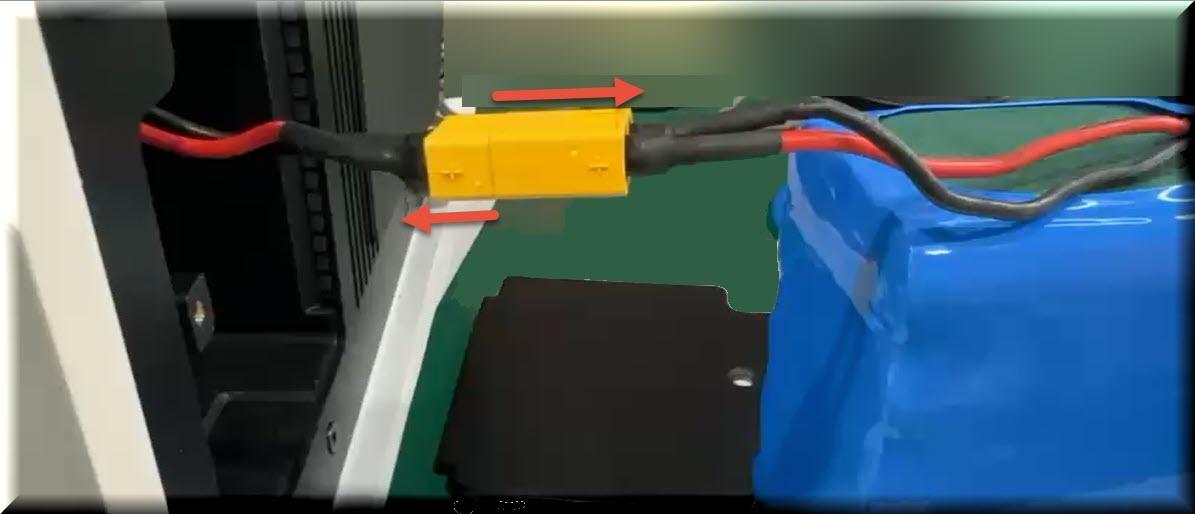
The red arrows show the direction to pull.
While gently pulling the two ends apart:
Slightly rock the connector side-to-side
Do not pull on the wires
The connector should separate smoothly.
7. Wait for the System to Fully Power Down
Once the connector is unplugged:
Your J-Ray 75 Laser will completely power off.
Wait 1–2 minutes before reconnecting the battery. This ensures the system electronics fully reset.
8. Reconnect the Battery
Reconnect the yellow connector by pressing the two ends back together until fully seated.
9. Replace the Battery
Slightly rock the connector side-to-side
Do not pull on the wires
10. Replace the Coverc
Reinstall the battery access cover.
Insert the silver knob and tighten it finger-tight only.
Do not overtighten.
11. Return the Laser Upright
Carefully place the J-Ray 75 Laser back in its normal upright position.
You can now power the laser on normally.
If the Issue Persists
If your J-Ray 75 Laser still does not operate correctly after performing this reset, please contact ServiceVet Technical Support.
When contacting support, please provide:
Laser serial number
Description of the issue
Any error messages displayed
Tip for J-Ray Users
The J-Ray 75 ISP Laser is designed with an internal battery system that allows several hours of operation, making it ideal for both clinic and mobile veterinary use. A hard reboot simply resets the internal control system and does not affect the battery or laser components.
This is Troubleshooting Guide #1.
Additional troubleshooting guides will be added to help J-Ray users quickly resolve common questions in the field.
A training video for this guide will be available soon!
 Return to J-Ray 75W ISP Laser Training Page